Breach and Plunder
One core. Four crews. One way out.
BetaFeature complete and being polished. Tell us what breaks.
Free Available for Windows, macOS, Android
Download it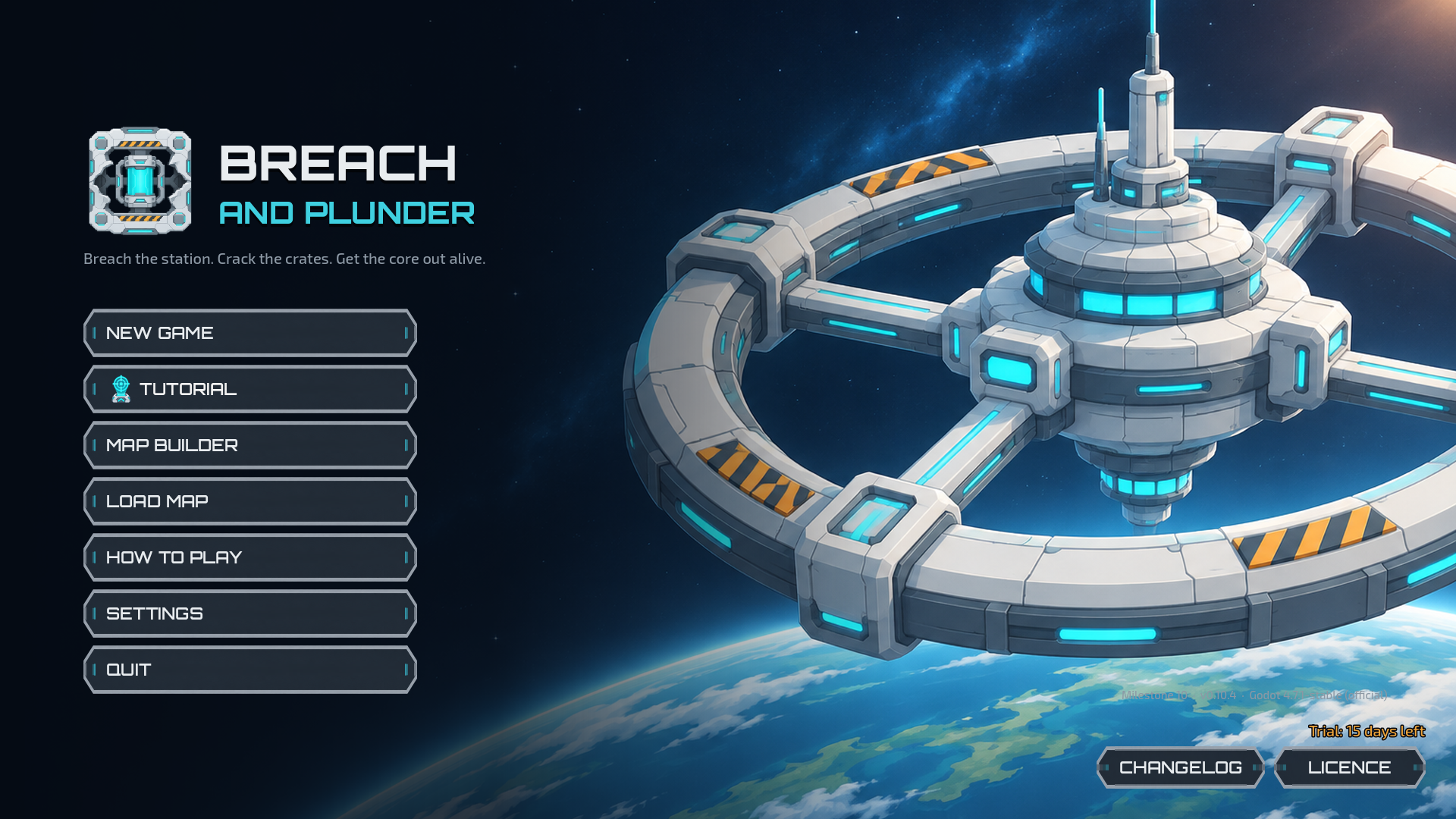
About the game
Breach and Plunder is a turn-based sci-fi tactics game for 1 to 5 players sharing one screen, inspired by classic dungeon-crawl board games. One to four squads break into a hostile space station to find a valuable cargo core and get it out. The fifth player is the Overlord: the station's own security AI, defending the cargo with robots, turrets, traps and a hand of dirty tricks.
Each squad picks four characters from six classes: Marine, Scout, Engineer, Medic, Heavy and Specialist. Every class has its own strengths and a signature ability. On each turn the whole squad rolls to move, then acts, then can play one card. Combat uses custom dice, so you see the odds before you commit.
Finding the cargo is a contest of its own. It is hidden in one sealed crate, and crates, lockers and barrels can hold med kits, ammo, salvage, booby traps or nothing at all. Vault doors and secure crates must be cracked with a timed circuit puzzle. Bulkheads can be blown open with breach charges, terminals hacked and power junctions cut to shut down turrets. Meanwhile the Overlord earns Threat to launch reinforcements, plays cards and makes the station fight back: lights out, venting atmosphere, sealed bulkheads, and drones that evolve into Hunter-Killers and Ravagers.
Ways to play:
- Solo squad: one squad against the Overlord. Two people can play head to head (one squad, one Overlord), or one person against the computer.
- Enemies: every squad for itself; the first to extract the cargo wins.
- Friendlies: all squads against the Overlord; one extraction wins for everyone.
- Alliances: two teams of two (squads 1 + 3 against 2 + 4).
- Computer players: any seat (squads or the Overlord) can be played by the computer at Easy, Normal or Hard.
Twelve curated scenarios come with the game, four for each world, each with its own map, mission briefing, settings and surprises: blast doors that lock behind you, robots that wake when you take the cargo, reactors that vent and storms that sweep the open ground. Vault Heist, Lockdown Protocol, Docking Ring and Cold Storage on the Space Station; Ghost Ship, Reactor Breach, Silent Hulk and Salvage Rights on the Derelict Ship; Dust Devil, Red Canyon Relay, Mining Colony and Last Light on the Planet Outpost.
Optional rules can be switched on or off per match: fog of war, loot level, breach charges, hot cargo, dropship extraction windows, circuit puzzles, the Overlord's deck (Classic, Hazards or Mixed), a squad points budget and a turn timer. Every squad earns Renown for kills, salvage and extraction, and the results screen ranks them all, win or lose.
The built-in Map Builder lets you design your own map in three worlds (Space Station, Derelict Ship and Planet Outpost, each with its own rules): drag floor tiles, walls, doors, objects, traps and markers into place, then validate the map. Maps can be made for any number of squads from 1 to 4: the game counts the squad zones you place and shows how many squads each map supports. Turn a map into a scenario with a briefing, fixed settings, chosen crate contents and event triggers (doors that slam shut, robots that arrive, messages), then test-play it straight from the builder. Its AI vs AI check plays computer-only matches on your map to see how balanced it is. The Orbital Vault sample map is built in, and new players can start with the Tutorial: a guided first match on the Training Deck.
Free trial and licence
The full game is free to try for 15 days from the first time you start it. After that, a licence code is needed to start or load games; saved games are kept, and the Map Builder, Help and Settings keep working. When you buy the game you get a licence code by email, tied to your email address. It works for life, on any computer you play on, and needs no internet connection: paste it into LICENCE at the bottom right of the title screen.
Updates
Breach and Plunder is updated as errors are found and fixed. Every update is listed in the ChangeLog, with the version number, the date and what changed. The same ChangeLog can be read in the game from the button in the bottom-right corner of the title screen.
Important
We can't afford Windows Code Signing, Apple Developer or Android Licensing right now. Our games are safe, and if needed we can provide scan details vs file hashes etc. You may be warned that you downloaded these files from the internet, we do promise they are safe.
Screenshots
Download it
Free to play. Pick your machine below.
Details
Controls
The game is played with a mouse, a touchscreen or a mix. Most actions work by clicking (or tapping) what you want to act on: the square to move to, the robot to shoot, the door to open.
Mouse and keyboard
| Left-click | Select a character; choose a move, target or option |
| Right-click (quick) | Cancel the current choice or targeting |
| Right- or middle-drag, or left-drag on the map | Scroll the map |
| Mouse wheel / trackpad pinch | Zoom |
| W A S D / arrow keys | Scroll the map |
| Space | Next phase (Overlord: end turn); confirm deployment |
| N | Next phase |
| T | Attack |
| I | Interact |
| C | Cards |
| G | Show or hide the grid |
| F | Fit the whole map in view |
| Esc | Cancel, or open the menu |
| F1 | Help (rules, cards and keys), anywhere in the game |
Will it run?
| Windows | 64-bit (x86_64) |
| macOS | Universal build (Intel and Apple Silicon). The build is not notarised yet: the first time, right-click the app → Open → Open. |
| Android | 64-bit ARM (arm64-v8a) phones and tablets, landscape, full touch controls |
Changelog
Breach and Plunder — ChangeLog
Newest first. Version numbers follow the milestones: 0.M.x is milestone M.
0.10.4 — 12 November 2026 · Free trial and licences
New
- The full game is free to try for 15 days. After that, a licence code is needed to start or load games. Saved games are kept, and the Map Builder, Help, Settings and this ChangeLog keep working.
- The bottom-right corner of the title screen shows "Licensed to …" or the trial days left, with a LICENCE button next to the ChangeLog. Paste the code from your licence email there. A code is yours for life, on any computer.
0.10.3 — 12 November 2026 · Fixes
Fixed
- A larger Interface size (Settings → Display) could push buttons off the screen. The title and New Game screens now shrink just enough to fit, and the Map Builder's top bar and the match's action buttons scroll sideways instead of running off the edge.
New
- Ending a squad's turn with moves or actions still unused asks first: it lists who still has moves or hasn't acted, with Keep playing or End turn. (The turn timer still ends the turn without asking.)
Older versions (19)
0.10.2 — 11 November 2026 · Extraction made obvious
Fixed
- It was easy to reach the extraction zone with the cargo and never extract, because extracting needed Interact → Extract in the action phase. Now:
- A ★ EXTRACT button appears whenever your carrier is on your extraction zone and the dropship can take it, and the hint bar says what to do.
- Ending the move or action phase while you could extract asks first: Extract now or Not yet.
- The tutorial's briefing and its cargo tip explain the button.
0.10.1 — 11 November 2026 · Sound set
New
- Settings → Audio → Sound set: choose between two complete sets of sound effects and music, one made by Claude and one by GPT, or Your picks (the sounds chosen for the game). A sound missing from one set is played from the other.
0.10.0 — 11 November 2026 · Scenarios, sound and accessibility (Milestone 10)
New
- Twelve curated scenarios, four per world, each with its own map, briefing picture, settings and event triggers. Pick them on New Game:
- Space Station: Vault Heist (up to 4 squads), Lockdown Protocol, Docking Ring, Cold Storage
- Derelict Ship: Ghost Ship, Reactor Breach, Silent Hulk (co-op), Salvage Rights
- Planet Outpost: Dust Devil, Red Canyon Relay, Mining Colony, Last Light (co-op)
- Sound and music: sound effects for every action, a music track for each world, the Overlord's turn, the tension of the last round and the Map Builder, and background ambience for each world. Sounds that haven't been chosen yet are simply skipped.
- Settings now has four tabs:
- Display: as before, plus a frame-rate limit (30 fps keeps older laptops cool).
- Audio: master, music, sound effects and ambience volumes.
- Accessibility: faction symbols on every token (circle, triangle, square, diamond; a hexagon for the Overlord), a colour-blind-safe squad palette, and reduced motion.
- Controls: rebind the game's and the Map Builder's single-key shortcuts.
- New Game shows the scenario's briefing picture (or the world's banner) under the map list, and the mission briefing shows it too.
- The results screen has victory banners for the squads and the Overlord.
- New app icon on Windows, Mac and Android, and a start-up splash screen.
Changed
- Computer squads open a crate within reach before trading shots with a rival, so rival squads that meet at the cargo no longer just brawl around it.
- Help: the Settings, Controls and Scenarios pages cover the new options and the curated scenarios.
0.9.0 — 11 November 2026 · Scenarios, test-play, new worlds and the tutorial (Milestone 9)
New
- Tutorial on the title screen: a guided first match on the Training Deck, one squad against an Easy computer Overlord, with a briefing and tips as you reach each step.
- Scenarios (Map Builder → Scenario), saved inside the map:
- a title and a mission briefing shown before the match
- match settings that fill in the New Game screen, and can be locked
- the Overlord's starting Threat and Threat per turn, and a fixed puzzle difficulty
- what each container holds, including which crate hides the cargo
- Event triggers: paint trigger areas, then choose up to two things that happen when a squad (or only the cargo carrier) first walks in: a message, lock or open the doors, launch a drone or an Enforcer, vent, lights out, extra Threat, or an alarm.
- Test-play from the Map Builder: play the map as it is now, as the squads, as the Overlord or watching the computer. Leaving the match returns you to the builder with the map exactly as you left it.
- New worlds (Map Builder → World):
- Derelict Ship: no power at the start, so turrets start offline; the hull vents by itself every 3 rounds, with a warning.
- Planet Outpost: sight +2 and longer long-range; a new Exposed ground marker where the dust storm deals 1 damage at the start of each Overlord turn.
- Until their art is made, new worlds show recoloured station tiles.
- New Game: the map list shows each map's world and whether it has a scenario; a scenario's settings are filled in (and greyed out if locked).
- Help: new Worlds and Scenarios and triggers pages.
Changed
- The Map Builder's top bar was tightened to fit the new World, Scenario and Test-play buttons.
0.8.3 — 11 November 2026 · Small maps and ChangeLog
New
- Maps no longer need four squad zones. A map supports one squad for each complete zone (a deployment zone plus its extraction zone), so maps for 1, 2 or 3 squads now validate.
- Map Builder: the top bar shows how many squads the map is for ("For 2 squads + Overlord"), and Validate lists it. A deployment zone without its extraction zone (or the other way round) is reported as an error.
- New Game: the map list shows how many squads each map supports. Picking a map highlights "This map supports x squads plus the Overlord", greys out squad counts the map can't hold, and the zone choices only list the map's own zones.
- A ChangeLog button in the bottom-right corner of the title screen shows this list in the game.
0.8.2 — 11 November 2026 · Solo squad
New
- A match can now have just 1 squad against the Overlord. That means two-player games (one squad against one Overlord), or a solo game against a computer Overlord or with the computer as the squad.
- With a single squad the Overlord fields half its usual starting garrison and gains 1 Threat a turn instead of 2, so one squad isn't facing forces built for four.
0.8.1 — 11 November 2026 · Fix
Fixed
- The new computer-player icons were drawn at full size in the seat menus on the New Game screen, which made every seat row and the drop-down list huge. The icons are now menu-sized. Icons in the in-match choice menus (search, crack, power, med station) got the same fix.
0.8.0 — 11 November 2026 · Computer players (Milestone 8)
New
- Any seat (squads or the Overlord) can be played by the computer at Easy, Normal or Hard.
- Every level plays by the same rules with the same Threat, cards and characters. A computer squad only knows what its own characters can see.
- Computer turns skip the handover screen and their battle screens close by themselves. A spinner and a computer badge in the top bar show when the computer is playing.
- An AI speed button in the top bar sets the pace: Normal, Fast, or Skip (a whole computer turn at once).
- The board and log always stay with the human players, so a computer squad's view is never shown.
- Map Builder: AI vs AI balance check plays 20–100 computer-only matches on the open map and reports wins by seat, match length and how long the cargo was carried.
- Help: a new "Computer players" page.
- The Heavy and Specialist can be set as required classes for a map.
Fixed
- The Map Builder's Markers tab crashed after the dark and venting markers were added.
- The "since your last turn" recap could show lines from another squad's private turn.
0.7.1 — 11 November 2026 · Art update
- Added the M6 and M7 artwork: six Overlord card illustrations, the offline turret, the venting gust and overwatch markers, power and med station icons, the Heavy and Specialist cards, ability and Renown icons and the Salvage find.
- New dark-section overlay that tiles cleanly. The venting-section overlay was imported.
- The art importer no longer adds a margin to tiling overlays, which caused visible seams.
0.7.0 — 11 November 2026 · Classes, Renown and Alliances (Milestone 7)
New
- Heavy: Health 10, +2 Armour, moves 1 less (minimum 2). Forced breach smashes an adjacent bulkhead, locked door or vault door open, with no charge and no blast.
- Specialist: range 7, sight 9. Overwatch takes a free shot at the first robot that stops in its sights on the Overlord's turn.
- Squad points budget: Unlimited (default), 10 or 12. Marine 3, Scout 2, Engineer 2, Medic 2, Heavy 4, Specialist 3.
- Renown: every squad scores it for destroying robots, downing rivals, Salvage finds and extraction. The results screen ranks all squads.
- New container find: Salvage (+2 Renown).
- Alliances (2 v 2): squads 1 + 3 against 2 + 4, with shared sight, cargo passing and either ally's extraction zone.
- Turn timer: off, 60, 90 or 120 seconds. It pauses during handovers, puzzles and choices.
- In Friendlies, every squad handover reminds players to make sure the Overlord isn't watching.
0.6.0 — 11 November 2026 · Power and hazards (Milestone 6)
New
- Power junctions: cutting one takes its turrets offline and switches off its cameras. A robot can switch it back on. Hover a junction to see its grid.
- Med stations: +3 Health, once per character per match.
- Dark sections: sight and attacks reach only 2 squares.
- Venting sections: new map markers, used by the Vent Atmosphere card.
- Six new Overlord cards: Vent Atmosphere, Lights Out, Seal Bulkheads, Turret Network, Restore Power and Overclock.
- Overlord deck option: Classic, Hazards or Mixed.
- The Orbital Vault gained med stations, a venting corridor and dark corners. Med stations were placed so the map's balance is unchanged.
- New Game screen reorganised so every option fits on screen.
0.5.1 — 10 November 2026 · Touchscreens and Android
New
- Touch controls:
- tap to act, one-finger scroll, pinch to zoom
- two-finger scrolling of lists, side panels and Help
- long press or a CANCEL button to back out of a choice
- Point-and-click targeting for cards, interactions and abilities: tap the robot, door or ally itself instead of choosing from a list.
- Larger, finger-friendly map list.
- Android: the back button cancels or offers Save & leave, and the match saves when the app goes to the background.
- The Orbital Vault map is built into the game, so a playable map always exists.
0.5.0 — 10 November 2026 · Circuit puzzles (Milestone 5)
New
- Vault doors and some secure crates are circuit-locked. Crack them by rotating wire tiles until power reaches the lock, against a timer or a move limit.
- Three difficulties. Engineers get 50% more time and two tiles set for them.
- A failed attempt gives the Overlord +2 Threat; you can try again later with a fresh circuit.
0.4.0 — 10 November 2026 · Breaching and extraction (Milestone 4)
New
- Breach charges: blow open striped bulkheads and locked doors at the start of your next turn, with a 3-dice blast.
- Hot cargo: the carrier is visible to everyone, and the Overlord gains extra Threat while the cargo is carried.
- Dropship windows: extraction is only open in rounds 5, 8, 11 and the last round, shown on a timeline in the top bar.
- Terminals: hack them to locate the cargo, download the map, control doors or seal an entry vent.
- Each of these is a switch on the New Game screen.
0.3.2 — 10 November 2026 · Fog of war, searching and help
New
- Fog of war (optional): squads only see what their characters can see; Friendlies share their vision.
- Searching containers: crates, lockers and barrels hide finds, traps and alarms. Real finds can be gambled for a mystery card.
- Split moves: stop part-way and carry on later in the same turn.
- Private logs: each squad only reads its own turns and anything that hits it. The Overlord's movements stay hidden.
- F1 Help: a topic-by-topic guide to every rule, card and key.
- Trap artwork and trap cards on the battle screen.
Fixed
- Doors wouldn't open when moving into fog.
- Robots could be hacked through walls before they had been seen.
- Robots that had lost their turn could still react to contact.
- The log showed every side's turns to everyone.
- The mouse wheel over a side panel zoomed the map.
- The top bar overflowed with four squads.
- Turret artwork lost its transparency.
0.3.1 — 10 November 2026 · Interface update
New
- New button artwork. The previous Godot-drawn buttons remain as a backup option in Settings.
- Each seat on the New Game screen shows a Human / Computer choice. Computer was locked until 0.8.0.
Fixed
- Buttons shrinking on hover, and ragged edges on ultrawide and 4K screens.
0.3.0 — 9 November 2026 · Squad identity and Overlord forces (Milestone 3)
New
- Class abilities with recharge times: Marine Shield wall, Scout Mark target, Engineer Hack and Medic Triage.
- Threat: the Overlord earns Threat each turn and spends it to launch Drones or Enforcers from entry vents.
- One drop pod per squad per match brings a downed character back.
- Range and cover: an extra Defence die beyond half range and behind cover.
- Portrait tokens cut from the card art; save, autosave and Continue match.
- Two to four squads as Enemies or Friendlies, and each squad picks its own four characters.
Changed
- Balance: Threat income lowered from 3 to 2 per turn and the cargo carrier's penalty from 2 squares to 1.
0.2.x — 9 November 2026 · Core match (Milestone 2)
New
- A complete hot-seat match: squads against a human Overlord on any valid map.
- Custom combat dice, rolled movement, and two 52-card decks with a private keep-4 draft.
- Character health and equipment, hidden bonuses, and an evolving security AI (Hunter-Killers and Ravagers).
- A battle screen for every encounter, a results screen and saved replays.
Changed (0.2.1–0.2.3)
- Turns became whole-squad turns in three phases (move, action, card); the Overlord takes the same phases after every squad.
- Contact reactions: robots can fire back when a squad comes within reach.
- Traps, Search and Scout and Engineer report-back.
0.1.0 — 9 November 2026 · Foundation (Milestone 1)
New
- Title screen and main menu.
- Space Station Map Builder: drag-and-drop floors, walls, doors, objects and markers, with undo, validation and save/load.
- The Orbital Vault sample map.
Credits and licences
- Engine: built with Godot Engine 4.7.1, which is free and open source under the MIT licence. © Godot Engine contributors (Juan Linietsky, Ariel Manzur and contributors).
- Fonts: Orbitron and Exo 2, both under the SIL Open Font License 1.1. The licence texts ship with the game (
assets/fonts/OFL_Orbitron.txt,OFL_Exo2.txt). - Artwork: the station tiles, characters, cards, icons and illustrations were made for this game with AI image generation, then processed by the project's own import script.
- Sound and music: generated procedurally in code for this game (no samples or third-party recordings).
- Game code: the rules, computer players, map builder and interface are original code written for this project in GDScript.
- Tools: the art import script (
tools/import_art.py) uses Python and the Pillow imaging library. It is used only during development and is not part of the game.